Design Systems × AI · Visa · VPDS
Built for people. Then built for their AI, too.
The site design-system adoption ran through had grown into a maze — and its audience had quietly expanded to include AI agents pulling components straight into a developer's workflow. I rebuilt it as one platform for both.
- Role
- Design lead, strategy through build
- Scope
- Full IA, content, accessibility, prod app
- Standard
- WCAG 2.1 AA · VGAR
- Shipped
- React + TypeScript, in production
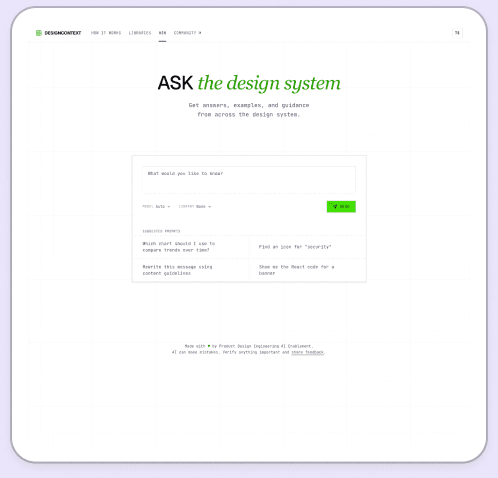
A site that had outgrown its own map
As Visa's design system expanded to include developer tooling, onboarding material, APIs, and AI-enabled workflows, the Design Context site became the front door to all of it — and it had grown the way most useful things do: organically, one addition at a time, until the map no longer matched the territory. Navigation mirrored internal team structure instead of what someone was actually trying to do. New users didn't know where to start. The newest, most important capability — connecting an AI tool like Claude Code directly to Visa's live components via MCP — was one of the hardest things on the site to find.
The real problem wasn't visual. It was that the site had become a collection of resources instead of a connected ecosystem, and it required a colleague's help — or a lot of trial and error — to get anywhere in it.
Organizing around intent, not org chart
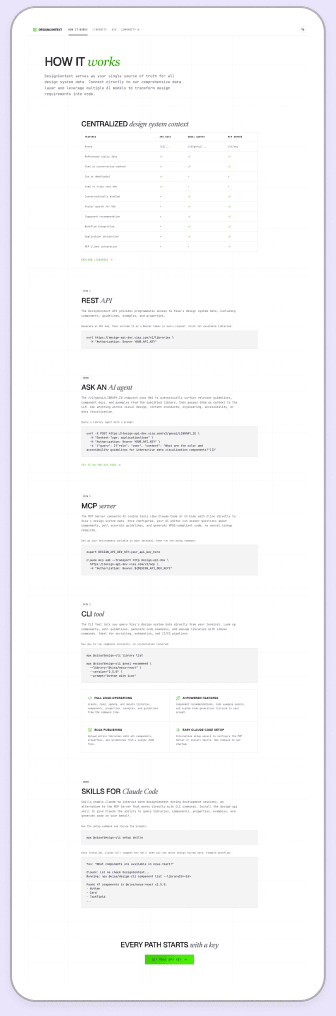
I set one guiding principle — shift the experience from a collection of resources to a connected ecosystem — and rebuilt the information architecture around what someone was trying to do, not which internal team owned the doc. Integration options became five intent-driven paths: MCP, REST API, CLI, GenAI, and Skills. I made MCP the default and first path deliberately, because the setup has a real dependency — the API key has to be exported before the connection command runs in the same terminal session — and ordering the experience to match that actual sequence removed a common point of failure.
I also rewrote the platform's language: outcome-first copy, second-person voice, plain-language setup steps in place of jargon-heavy blocks, and reusable content standards so the site stays coherent as new contributors extend it.
Accessibility as proof, not a checklist
“Approachable for everyone” only means something if it's verified. I rebuilt the version-history accordion from a mouse-only control into real buttons with proper ARIA states and full keyboard operation, added aria-sort semantics to sortable tables, lifted body-text contrast to roughly 11:1, and honored reduced-motion preferences — bringing the site to WCAG 2.1 AA and Visa Global Accessibility Requirements.
I didn't hand off a spec. I shipped the site.
The redesign is a production React and TypeScript application, including a full admin analytics area — overview, users, libraries, endpoints, MCP tools, performance, and errors — and an interactive API documentation explorer, wired to the live design API with a graceful fallback to representative data. Designing the system and building the thing that proves it is how I did this work.
One platform, two audiences
The same site now onboards a new designer and connects an AI agent to Visa's live component library — through the same intent-based paths, held to the same accessibility bar.
A design system is only as adopted as its front door. I rebuilt the door.